Insurance Quote Portal & Operations Platform
Simplifying complex insurance journeys for small business owners and internal teams
Role: UX Design Strategist / Lead
Industry: Insurance
Platforms: Responsive Web (Desktop, Tablet, Mobile) and Internal Operations Platform
Focus: UX Strategy, User Flows, Responsive Design, Interaction Design, Enterprise Design Systems, Prototyping
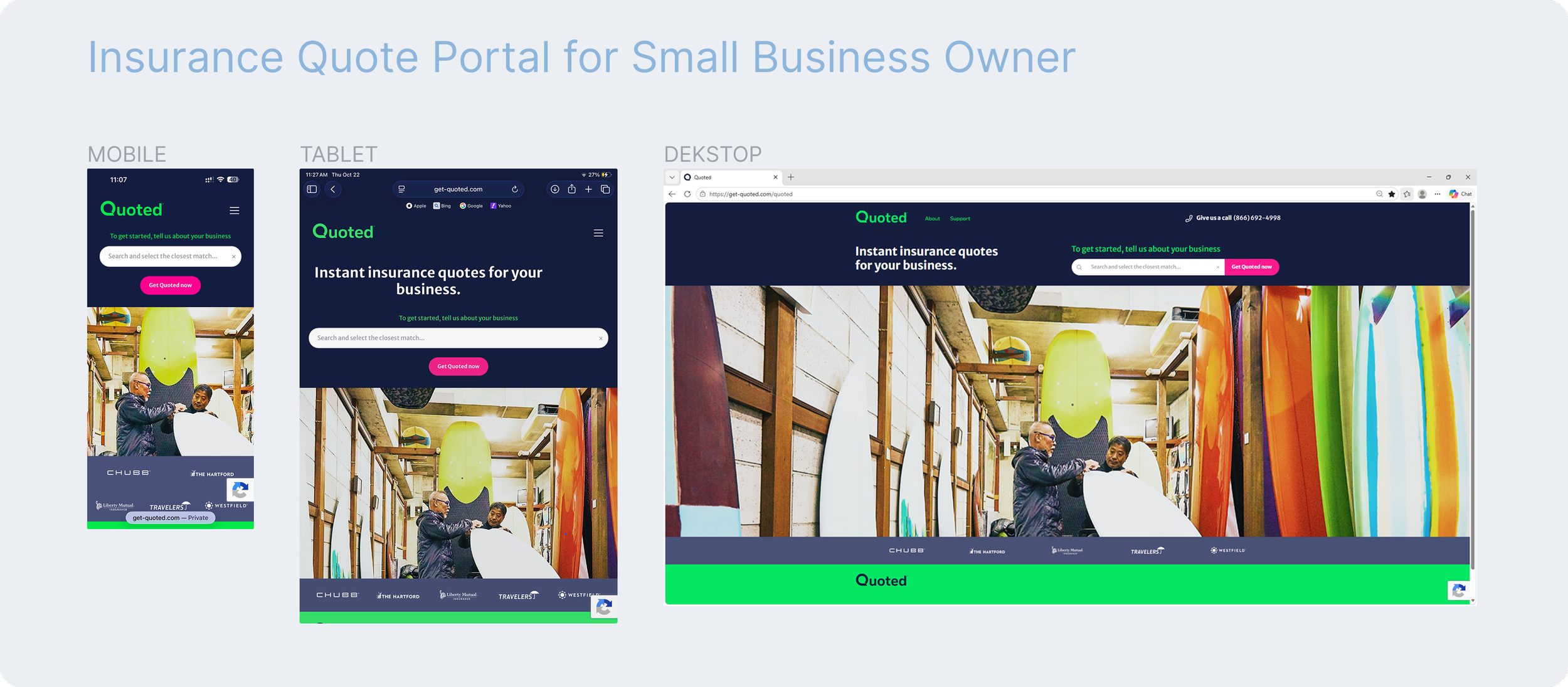
The Challenge
Finding the right business insurance shouldn't feel complicated. Yet small business owners must navigate unfamiliar coverage options, extensive forms, and complex requirements to request a quote.
Behind the scenes, business teams face a different challenge of managing operations, compliance, and insurance partners efficiently.
Our Goal
Create a seamless, intuitive digital experience that makes insurance quoting easier for small business owners while empowering internal teams with a scalable, efficient operations platform.
The Experience
A connected, dual-platform solution combining a responsive customer facing quoted portal with an internal business management platform designed to balance user simplicity, business needs, and technical complexity.
Designing for Two Distinct Audiences
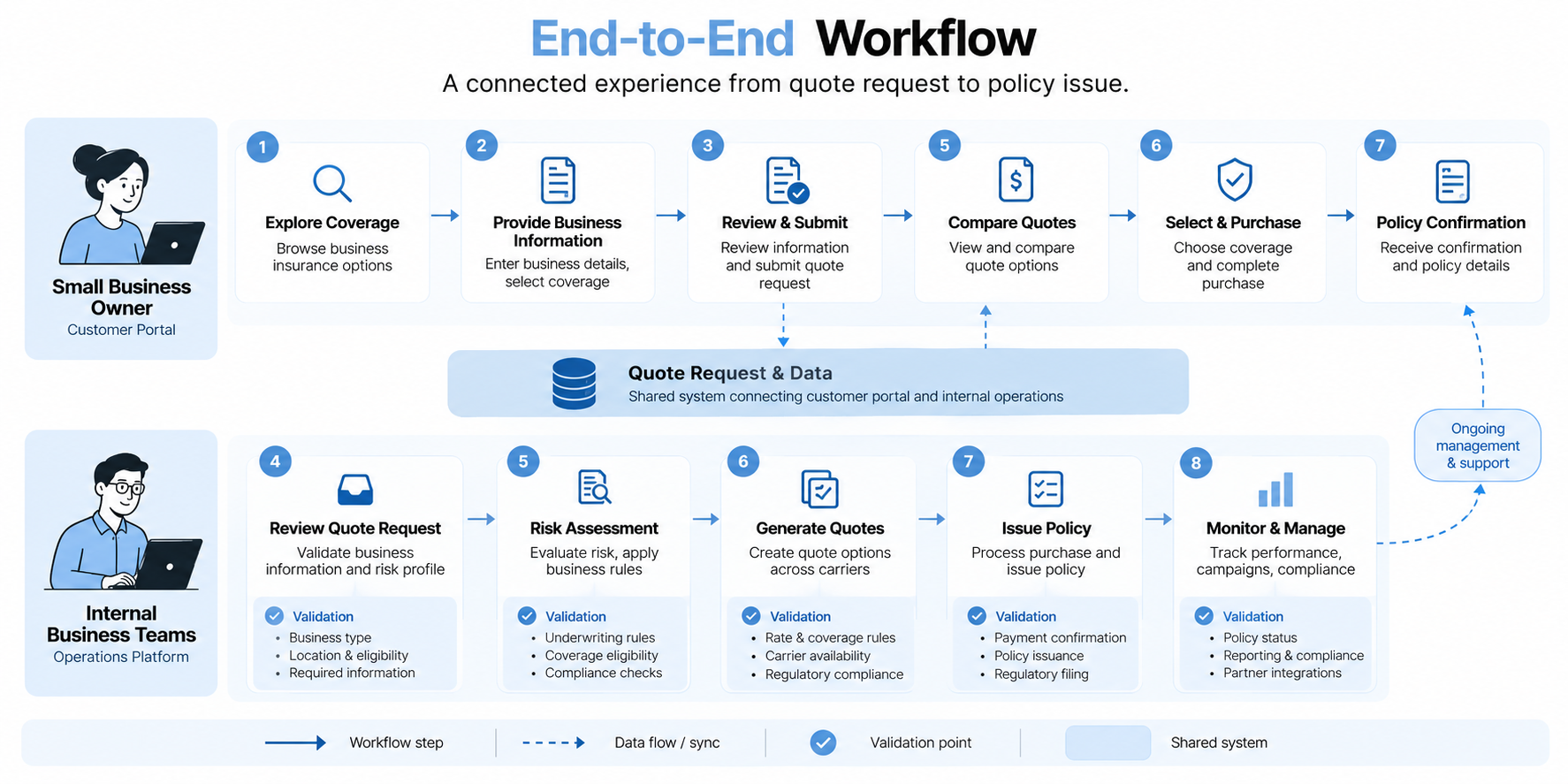
The project focused on creating a connected digital insurance experience for two audiences with different needs.
Small business owners needed a clear, approachable way to explore, compare, and select insurance coverage without navigating overwhelming forms or unfamiliar terminology.
Internal business teams needed efficient tools to monitor portal performance, manage marketing campaigns, generate compliance reports, and onboard insurance partners.
The design challenge was to simplify both experiences while supporting complex insurance requirements, enterprise standards, and future partner integrations.
Making Insurance Simpler
Insurance quoting involves extensive data collection, conditional eligibility rules, multiple carriers, and coverage calculations.
For small business owners, these requirements translated into lengthy, dynamic forms that could become difficult to navigate, particularly on smaller screens.
For internal teams, the challenge involved managing reporting, partner onboarding, and operational workflows within a scalable framework.
The design opportunity: Make complex processes feel clear and manageable without compromising the information or controls required by the business.
Mapping the Experience Before Designing Screens
Began by mapping end-to-end user flows for both platforms, identifying key interactions, decision points, conditional logic, and system dependencies.
Early sketches and collaborative reviews helped clarify how users would move through the experience and where technical or business requirements influenced the journey.
These flows established a shared understanding across stakeholders and provided the foundation for wireframing and interaction design.
Turning Complex Forms into Manageable Steps
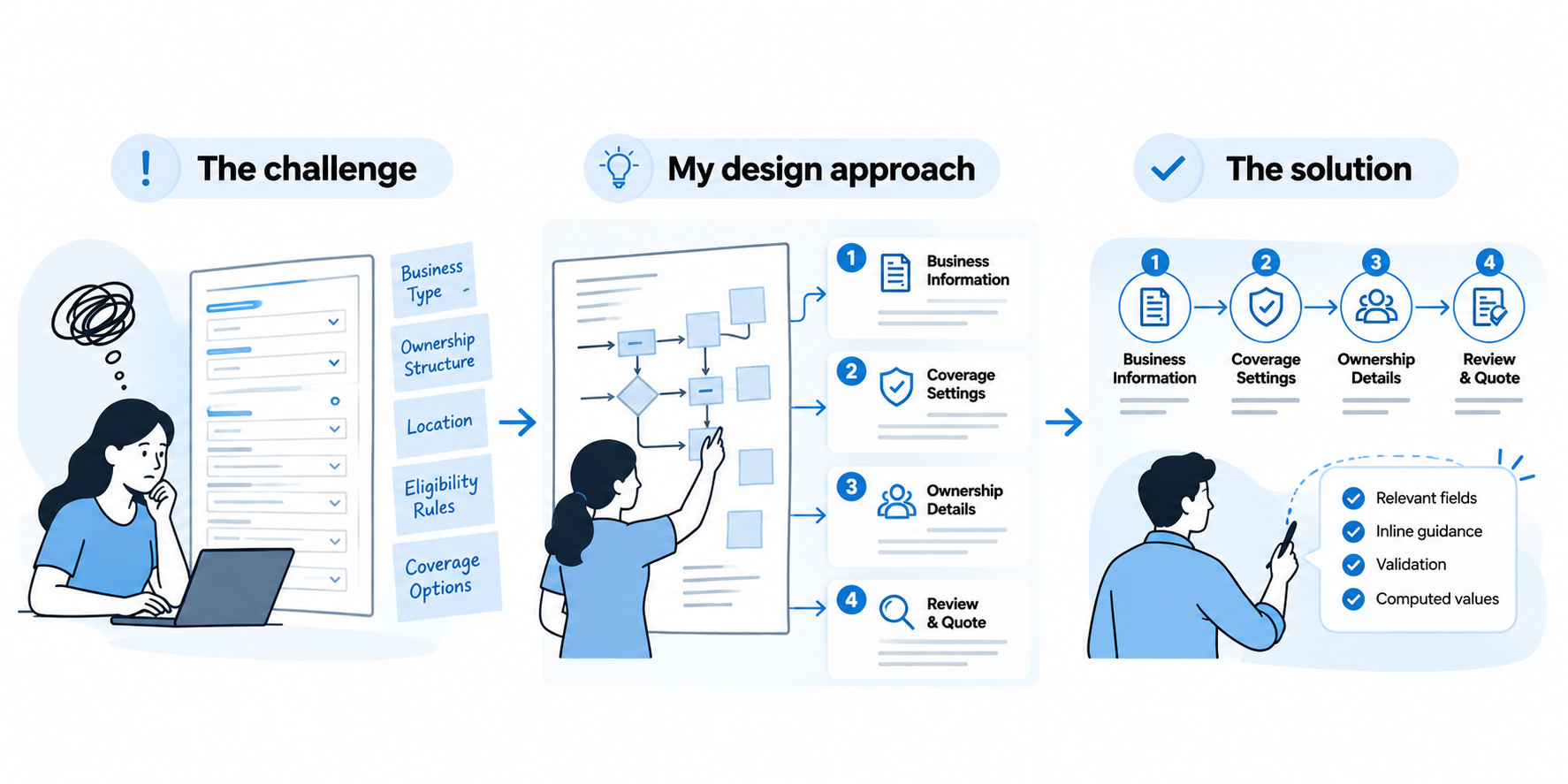
The challenge
The customer quote journey required extensive information that changed dynamically based on business type, ownership structure, location, and eligibility criteria.
Design iterations revealed that displaying too many fields simultaneously increased cognitive load, particularly on mobile devices.
My design approach
Reorganized the experience into logical sections, including business information, coverage settings, and ownership details.
Progressive form interactions helped users focus on relevant information, while validation patterns and inline guidance clarified requirements and computed values.
The solution
A structured, multistep quote experience that made complex data collection easier to navigate while retaining the information required for insurance quoting.
One Experience, Adapted Across Devices
Responsive behavior was considered during wireframing rather than added after visual design.
Developed mid-fidelity layouts using consistent grid structures and interaction patterns across desktop, tablet, and mobile.
Desktop: Up to four fields per row to support efficient data entry.
Tablet: Two-column layouts to balance readability and available space.
Mobile: Single-column layouts with touch-friendly spacing and clearer task progression.
The objective was to preserve usability and interaction clarity across screen sizes without changing the underlying business logic.
Building Trust Through Visual Consistency
Explored competitive insurance experiences and visual references to establish a direction centered on trust, clarity, professionalism, and approachability.
High-fidelity designs were developed using the Enterprise Design System (EDS), applying established typography, colors, spacing, and reusable UI components.
For content-heavy screens, emphasized information hierarchy, readability, clear interaction states, and consistent patterns.
Adapted layout containers and components to accommodate data-heavy operational modules while working within enterprise design constraints.
Supporting the Teams Behind the Customer Experience
Beyond the public quote portal, also designed workflows for an internal operations platform supporting business management and future growth.
The experience included:
Portal performance monitoring and reporting
Marketing campaign management
Compliance reporting workflows
Insurance partner onboarding
The design approach focused on clear navigation, structured data presentation, reusable interaction patterns, and flexibility to support additional partners.
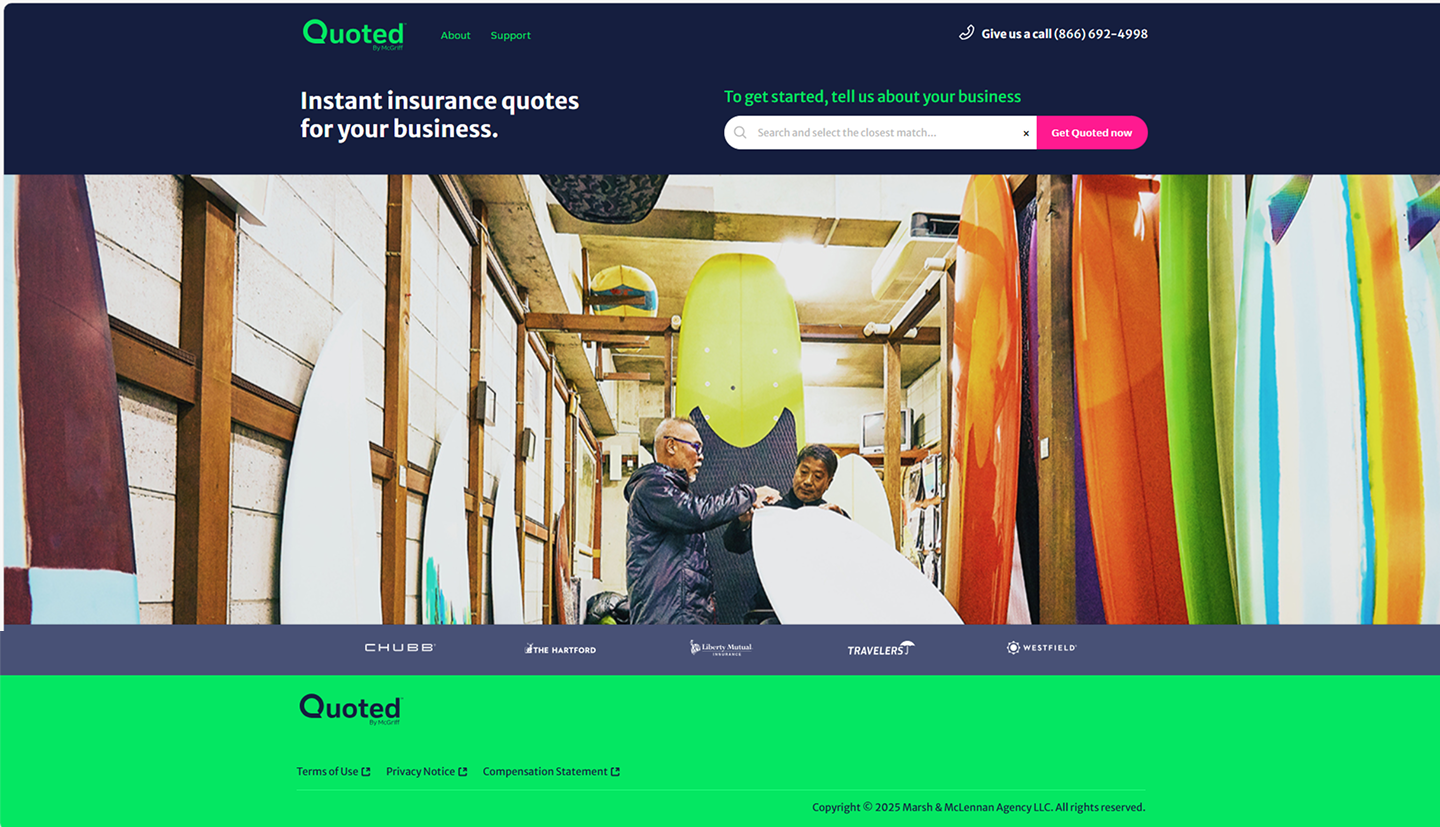
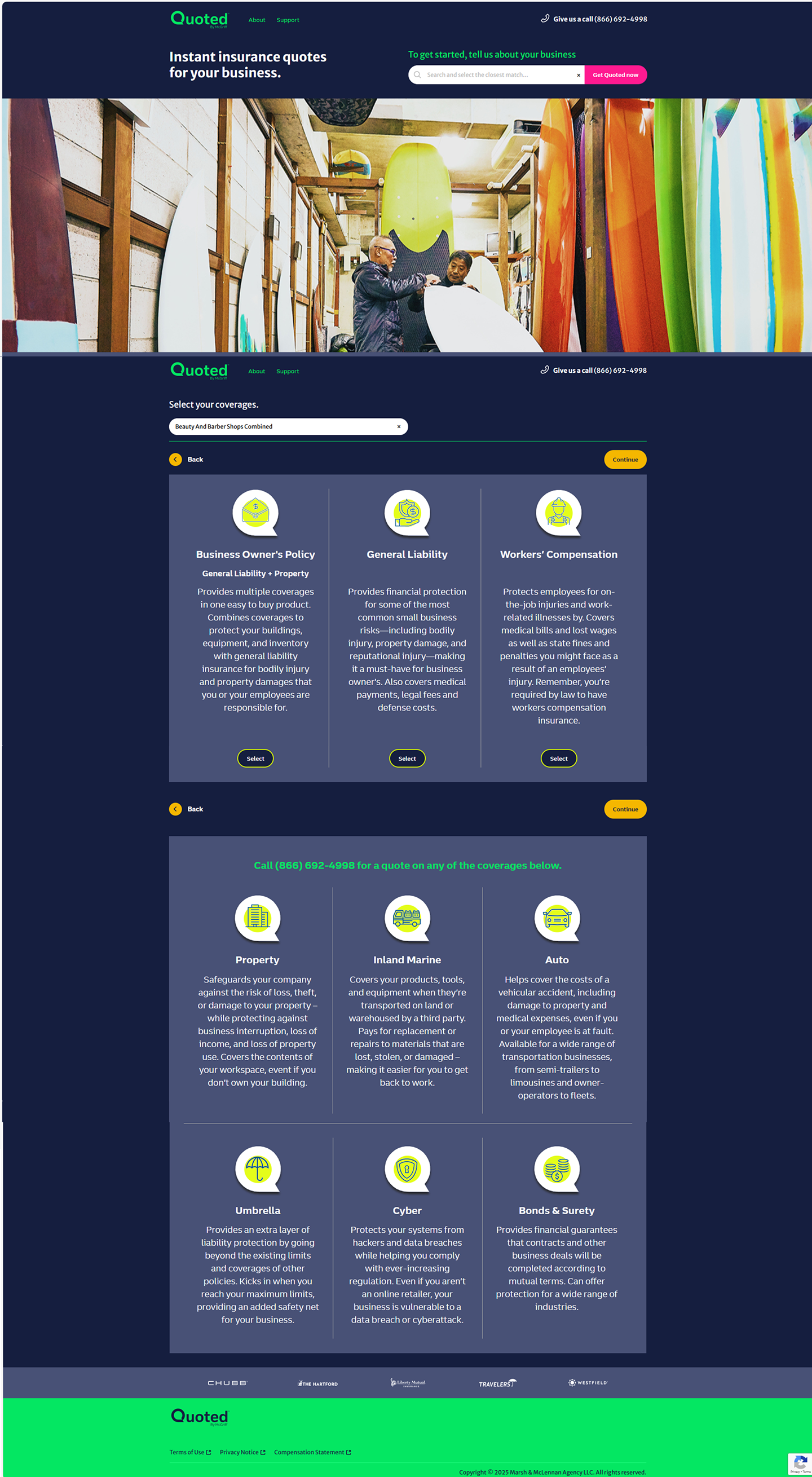

To inform this visual direction, I explored emotional and competitive design cues.
Mood Board & Competitive Landscape Insights
To ground the product’s design direction in both emotional resonance and market expectations, I developed a visual mood board paired with a competitive feature audit of top insurance platforms and enterprise operations tools.
Establish a tone of trust, approachability, and clarity—especially for first-time insurance users
Explore visual metaphors related to security, professionalism, and small business empowerment
Align imagery and component patterns with enterprise complaint design system
Enterprise Design System (EDS) - foundational style guide
To ensure consistency, scalability, and accessibility across both the customer-facing quote portal and the internal business platform, all UI designs were built using our Enterprise Design System (EDS) as the foundational style guide.
• Extended style containers for data-heavy modules
• Maintained intuitive flows within enterprise constraints
With system components ready, I turned designs into interactive experiences to simulate real-world usage.
Interactive Prototypes
Bringing the experience to life and validate the design logic early, Developing interactive prototypes in Figma for both the customer-facing quote portal and internal business platform. These clickable flows helped stakeholders, developers, and testers experience the interface in context—well before development.
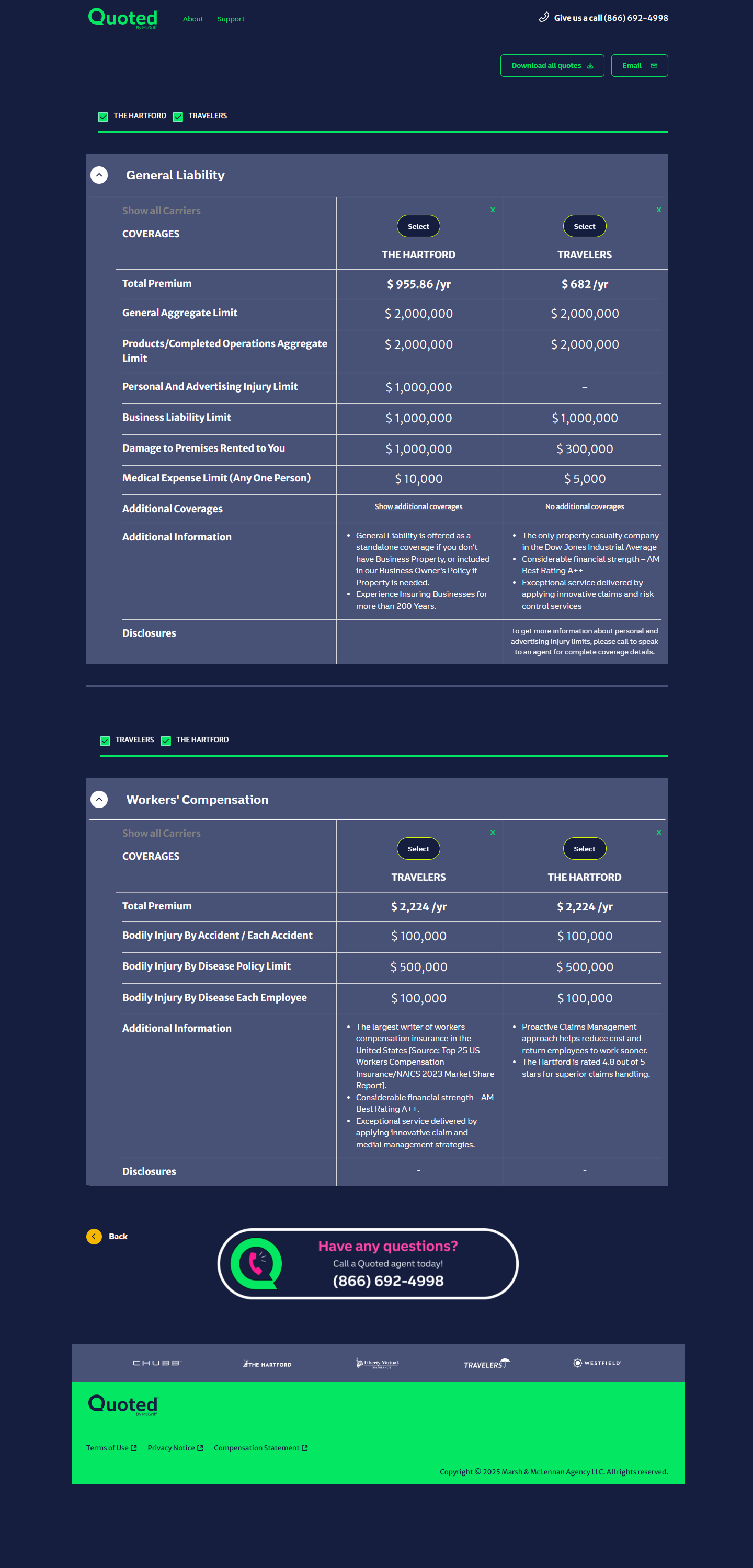
Simulated quote tasks, comparisons, and reporting
Facilitated feedback and improved developer handoff
Prototyping uncovered design challenges that required thoughtful UX problem-solving.
Challenges & UX Solutions
As the project progressed, we navigated design complexities—from quote logic to reporting UX.
Addressed backend errors and validation patterns
Reduced drop-offs with clearer flows and micro-interactions
Each challenge tackled contributed directly to overall impact across platforms.
Challenge 1 - Stakeholder Expectations vs. Technical Feasibility
Technical constrains/limitation - where expectations don’t align with the technical realities
unpredictable delays or failure points - communicating Stakeholders on these constraints
pressure on the team
Solution- Collaborate to bridge this gap
collaborated closely with developers to prototype a realistic version of the proposed task flow
Designed an interactive prototype to simulate the end-user experience
Facilitated a walkthrough session with stakeholders using the prototype to explain what’s feasible, what’s risky, & where trade-offs were needed with team.
Outcome
The visual and functional clarity of the prototype helped align stakeholders with technical constraints. They not only signed off on the revised feature scope but appreciated how the design preserved user trust through thoughtful fallback messaging and progressive loading cues. This exercise showed how UX isn’t just interface design—it’s strategic communication that helps teams converge around what's both desirable and achievable.
Challenge 2 - Designing Complex Multistep Insurance Quote Forms Across Devices
Small business users interacting with the Insurance Quote Portal were required to fill out extensive, variable forms. These forms adjusted dynamically based on business type, ownership structure, location, and other eligibility criteria—feeding into automated coverage calculations from multiple carriers.
Form was data-heavy and changed field sets based on business type and ownership %
Field density and layout adaptation across devices
Iteration rounds revealed cognitive overload from seeing too many fields at once, especially on smaller devices.
Solution - Led iterative design sessions to address layout complexity and task clarity
Created grouped section views that broke forms into digestible, themed clusters - business info, coverage settings, ownership breakdown
Used progressive form logic to validate and expand sections as completed - minimizing user overwhelm
Defined responsive breakpoints where:
Desktop showed up to 4 fields per row
Tablet collapsed to 2 per row
Mobile streamlined to 1 field with touch-friendly spacing
Included inline guidance for computed values, helping users understand input-output relationships
Outcome
The final experience delivered an intuitive, responsive multistep form that respected user cognitive limits while satisfying carrier data requirements.
And also letting Users feel confident navigating dense insurance details with ease, thanks to scoped views and microcopy guidance
This challenge highlighted how responsive design, validation logic, and content grouping can turn overwhelming workflows into intuitive experiences—especially for users who aren’t insurance-savvy.
Each challenge tackled contributed directly to overall impact across platforms.
Impact
Throughout this project, as a UX Design lead Strategist guiding both vision and execution, from whiteboard flows to final interactive prototypes. My contributions directly shaped the clarity, usability,
and scalability of the dual-platform experience.
Once the dust settled, I reflected deeply on what this experience taught me.
Reflection
This project challenged me to go beyond surface-level work and dive deep into system design, workflow orchestration, and the realities of enterprise governance.
• Balanced clarity with extensibility
• Advocated for users while meeting enterprise needs
• Collaborated with cross-functional teams to scale thoughtfully
Even though the platform launched successfully, there were still opportunities I saw for future refinement.
What I’d do next…
While the platform delivered on its core goals and received positive internal feedback, there are a few directions
I would explore further to enhance both user experience and business value.
Add contextual help for insurance jargon-heavy flows
Conduct usability tests with real end-users
Leverage usage data for iteration cycles
And that brings me to the final chapter of the journey…
Conclusion
This project was a unique opportunity to solve complex problems for two very different user groups—small business customers seeking clarity and speed, and internal business users needing structure and control. Through structured user flows, responsive mid-fidelity wireframes, Enterprise scalable component design system (EDS), and detailed prototyping in Figma, I helped transform abstract insurance workflows into a clear, efficient, and user-focused product experience. Adherence to the enterprise design system ensured long-term maintainability, while flexible thinking allowed the product to retain personality and empathy.
The result: a platform that supports business growth, regulatory confidence, and real-world usability across all touchpoints—whether a coffee shop owner is reviewing quotes on a phone or a spa owner from a tablet.